Copper Kettle
Craft and load the kettle, provide direct heat, and follow recipe-specific cooking and stir targets.
- Total slots
- 16
- Setpoint
- 60–100 degrees; steps of 5
- Heat source
- Directly below
- Batch
- Four portions

Native model preview rendered from the shipped Brewhaven model and texture.
Obtaining the station
Build a Copper Kettle to begin a batch. 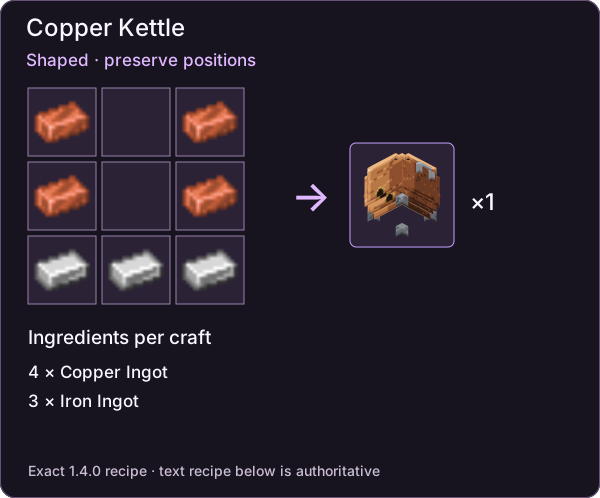
Craft one kettle with the shaped pattern below. Rows run top to bottom; . is empty.
C.C
C.C
III
C = Copper Ingot (four total); I = Iron Ingot (three total). See Workshop crafting for the paddle, thermometer and other stations.
Slots and inputs
| Slot group | Count | Purpose |
|---|---|---|
| Ingredients | 6 | Exact ingredient multiset for the selected recipe |
| Water | 1 | Water bucket for the batch |
| Serving bottles | 1 | Four glass bottles for four portions |
| Returned containers | 4 | Containers returned during processing |
| Outputs | 4 | Resulting portions |
A successful start consumes the required inputs together. Old outputs and returned-container space can prevent a transaction; clear those areas before retrying.
Heat, stirring and completion
A qualifying heat source belongs directly below the kettle. Choose a setpoint between 60 and 100 in steps of five. Stir windows and target cook duration come from the selected recipe, rather than a universal timing shared by every drink.
The Stop action becomes available at half of the target cooking duration. A forced finish occurs at twice that duration. Heat loss pauses both time and temperature; breaking an active batch produces spoiled portions.
For a concrete sequence, follow the Wheatbeer guide, which uses a target of 80 degrees and eight minutes of cooking.
Access and automation
New machines default to public. An owner or operator can set owner-only access. The report allows automation when the server automation setting is enabled and the machine is public.
Top insertion routes to inputs, back insertion to auxiliary supplies, and bottom extraction to outputs. Supported rising redstone edges trigger start or finish behavior. The documented comparator values are 0 empty, 1 loaded, 2 processing and 15 ready.
These are reported static handling rules, not evidence of a new concurrency test with two players or a particular protection mod.
Check a temperature reading
Use the reusable Thermometer on a kettle you may access. Actual heat begins at 20 and rises one degree per loaded active second toward the setpoint. Cooking begins at 60. Choose the recipe’s target, then use cooking elapsed time for its stir checkpoints, each with ±5 seconds tolerance. The Stirring Paddle has 64 durability and no repair recipe in the report.
The quality reference explains the separate cook, temperature and stirring penalties. Machine handling covers blocked starts and deliberate disposal.
Admin & server owner reference
Exact identifiers, original fields and source locators are preserved below. These records describe the documented mod version; they are not commands to run or proof of a new gameplay test.
Original wording and exact fields
The report identifies the Copper Kettle as a craftable brewing machine.
Original wording and exact fields
Starting consumes inputs atomically in the reported implementation.
Exact identifiers in context
C = minecraft:copper_ingot (four total); I = minecraft:iron_ingot (three total). See Workshop crafting for the paddle, thermometer and other stations.
Registry IDs
brewhaven:copper_kettle
Sources & verification
Evidence: pdf-derived. Feature status: implemented-static. Article coverage: ready.
PDF pages 6–9, 16, 18 · 04 / Brewing stations; 08 / Workshop · Brewhaven:E06, Brewhaven:E07
Reported static behavior and packaged definitions; no new Minecraft playthrough or Java behavior audit. Pack overrides unknown.
The wiki has not independently playtested report-derived instructions. Your server or modpack settings may change them.