Set up WaterMedia 3 for linked media
Set up the two media mods used by Afterfall television and online radio, then follow the game’s playback controls.
- Software authors
- SrRapero720 / WaterMedia Team
What you need
WaterMedia helps another mod show pictures and video or play sound from a link. In Afterfall, it supports linked television and online radio. It does not add a television, radio, recipe or Minecraft playback menu by itself. The original software is by SrRapero720 / WaterMedia Team, with WATERMeDIA as its stylized branding.
For the supplied Afterfall setup, use these exact components in a compatible Minecraft 1.21.1 / NeoForge client instance with Java 21:
| Component | Reported file |
|---|---|
| Main library | watermedia-3.0.0.23.jar |
| Native companion | watermedia-binaries-3.0.0.6.jar |
| Media feature | A compatible Afterfall build, which supplies the television/radio and controls |
The report did not launch this pair or rebuild Afterfall’s distributable. WaterMedia 3 cannot substitute for version 2 in an older integration. A mod made for a different WaterMedia 3 release can also need an update before it works with this one. Use the exact versions your mod’s instructions call for.
Install and use the feature
- Check the instructions for the mod that adds your television or radio against the Minecraft, loader, Java and media-library versions in your instance. The table above is the supplied local pair, rather than a recommendation to substitute arbitrary newer files.
- Place both media JARs in that playback client’s instance
modsfolder alongside Afterfall or the other mod that adds the media feature. In the supplied Afterfall instructions, each multiplayer listener installs the pair locally; the Afterfall dedicated server does not require this optional pair. Other consuming mods may have different side requirements. - Start the client normally and check its startup log if media is unavailable. The companion prepares the playback software for your computer. Unpacking those files does not by itself mean playback is ready; neither step was tested in the reports.
- Open the television, radio or other media feature in your game. For Afterfall, use the television or radio instructions. That mod supplies the place to enter a link and the playback controls.
- Give the link and its picture or sound time to load. A waiting display does not by itself mean the link failed. If it remains unavailable, note whether the game failed to start, the link stayed unavailable, or picture or sound never appeared. That gives a more useful report than repeatedly pressing Play.
The expected result is media appearing or sounding through the television or radio once the link and your computer are ready. This is the behavior to check, not a playback result verified by this wiki. First use of an online source can involve an on-demand helper download according to the reported Afterfall instructions. No third-party media was fetched for this documentation.
What still works without linked playback
Afterfall’s emergency television broadcast is its own fallback. Its original radio tracks and server-file music are also separate from the optional media pair. Linked television/video and online-radio media use the pair. Installing WaterMedia does not replace Afterfall’s power, ownership, tower, station or permission rules.
If the television has a picture but no sound, check your selected sound device and the television’s volume. Afterfall TV can still try to show a silent picture when its sound system is unavailable. Linked radio needs that sound system and cannot play without it. A working block or fallback broadcast does not prove linked media is ready.
Admin & server owner reference
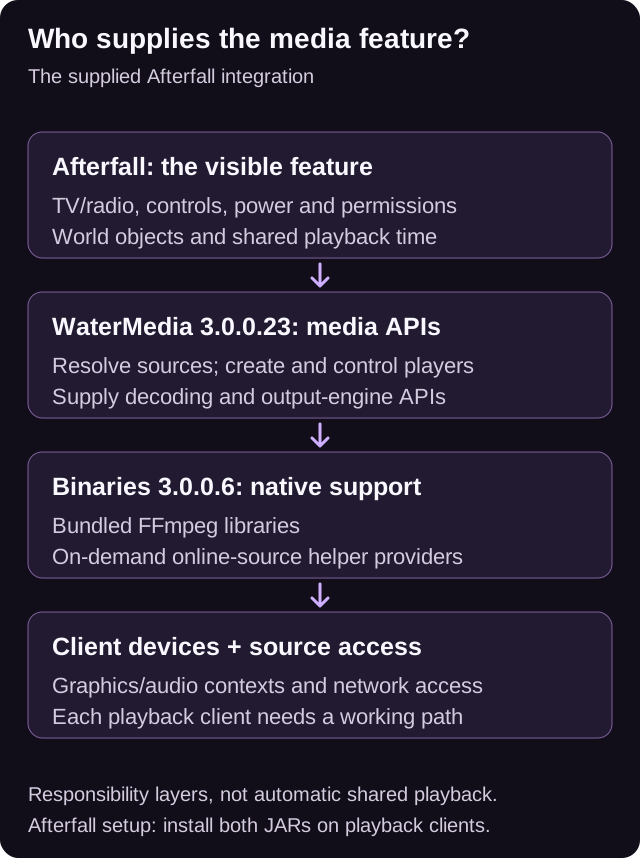
Original explanatory diagram based on the supplied report, pages 3-5, 9-10, 13-14. It illustrates reported behavior; no runtime test was performed.
Pairing and release labels
WaterMedia resolves sources and supplies playback APIs. In this release start() / startPaused() signatures change, so the consuming binary may require rebuilding. Afterfall’s TV can create graphics without an OpenAL audio context; its radio requires that context.
The main static module list directly constructs org.watermedia.binaries.WaterMediaBinaries. The missing explicit companion dependency in the main Fabric metadata is not evidence that the companion is optional during normal startup. Binaries declares WaterMedia >=3.0.0.22; this setup uses 3.0.0.23.
The main file has a reported Beta label and RC changelog terminology. Binaries has a reported Release label and RC terminology. Neither label establishes runtime certification. Fabric client-only metadata, broader project client/server descriptions and a server timeline implementation describe different layers; the Afterfall client installation rule must not be generalized to every integration.
The start() / startPaused() return type changed from void to boolean in 3.0.0.23. Preserve the dependent JAR’s build identity when diagnosing linkage problems. No JAR, helper, desktop application or game was executed to prepare this article.
Sources & verification
Evidence: pdf-derived. Feature status: mixed. Article coverage: ready.
Local documentation context: Minecraft 1.21.1 / NeoForge; no launch verification
PDF pages 3-5, 13-17 · Purpose; build identity; installation; integration; verification · WaterMedia:L1-L6, WaterMedia:W1-W3
Attributed static report findings only. Matching JARs and consumer source not independently inspected for this wiki. No game, native/helper, source-fetch, playback, desktop-app, multiplayer or performance test performed.
The wiki has not independently playtested report-derived instructions. Your server or modpack settings may change them.