Craft, color and recharge a headlamp
Fit a lamp to your helmet, choose its color, switch it on and carry the right fuel to recharge it.
These guides describe the October 23, 2026 source snapshot. Two different downloads share the 1.3.1 label; neither was confirmed to match this snapshot.
Fit a lamp to a helmet
A headlamp keeps your helmet’s armor while adding rechargeable visual light. You craft onto the helmet you already have; there is no separate headlamp item to find.
This light does not change mob spawning or other world-light mechanics. Use placed lighting wherever those mechanics matter. The instructions below use the reported 1.3.1 defaults; a server can change lamp brightness and capacity for future crafts and recharges.
Craft the helmet
At a crafting table, gather six glass blocks of the same exact item, one glass pane, one power source, and one helmet. Choose a torch, soul torch, redstone lamp or redstone torch as the power source.
Place each ingredient in this exact 3×3 arrangement. Rows run from the top of the crafting grid to the bottom.
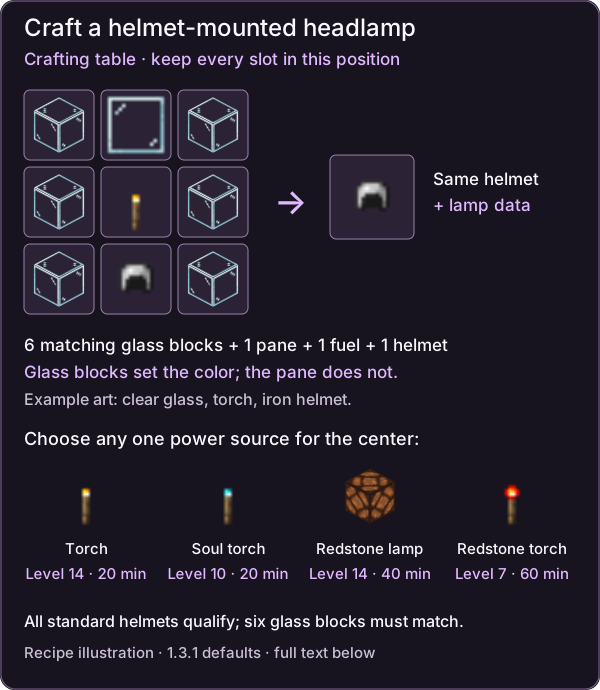
Recipe illustration from the reported 1.3.1 rules. Clear glass, a torch and an iron helmet illustrate the slots; the four power choices are shown below the grid. The output is your original helmet with a fitted lamp. Vanilla artwork © Mojang/Microsoft; original wiki layout.
| Grid row | Left slot | Middle slot | Right slot |
|---|---|---|---|
| Top | Glass block | Glass pane | Glass block |
| Middle | Glass block | Power source | Glass block |
| Bottom | Glass block | Helmet | Glass block |
All six glass blocks must match. Even one different glass block rejects the recipe. The pane in the top middle slot does not choose the lens color.
Take the resulting helmet and equip it in your head slot. It starts fully charged and switched on. The input helmet’s type, armor, toughness, existing damage, enchantments, trim, custom name and other custom data are retained. The lamp adds an item-name label. Obtaining a helmet, or already knowing the recipe, supplies the recipe-book unlock.
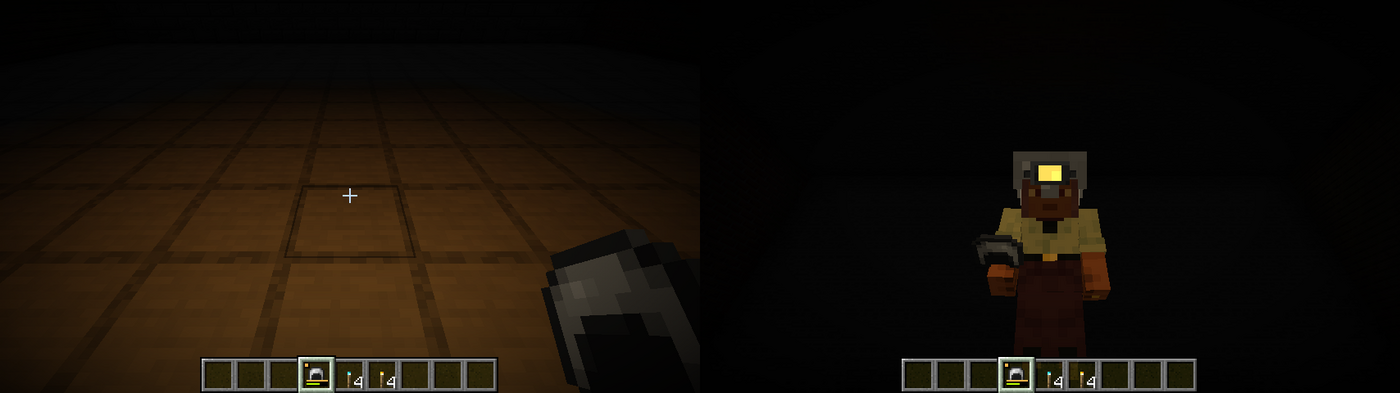
Historical version 1.1 capture from the supplied development record. It illustrates the worn lamp; it is not a new 1.3.1 gameplay check or a picture of the current crafting recipe.
All standard helmet types qualify. Third-party helmets need the appropriate tag; recipe eligibility does not prove that the lamp model aligns with every custom head shape.
Choose power and carry the right recharge item
| Power source | Light level | Clear-glass color | Full charge | Accepted recharge item |
|---|---|---|---|---|
| Torch | 14 | Warm | 20 minutes | Torch or soul torch |
| Soul torch | 10 | Blue | 20 minutes | Soul torch or torch |
| Redstone lamp | 14 | Warm | 40 minutes | Redstone lamp only |
| Redstone torch | 7 | Red | 60 minutes | Redstone torch only |
These are the 1.3.1 defaults for both crafting and recharging. A held redstone lamp has a separate level-15 item rule; it does not give a helmet lamp level 15.
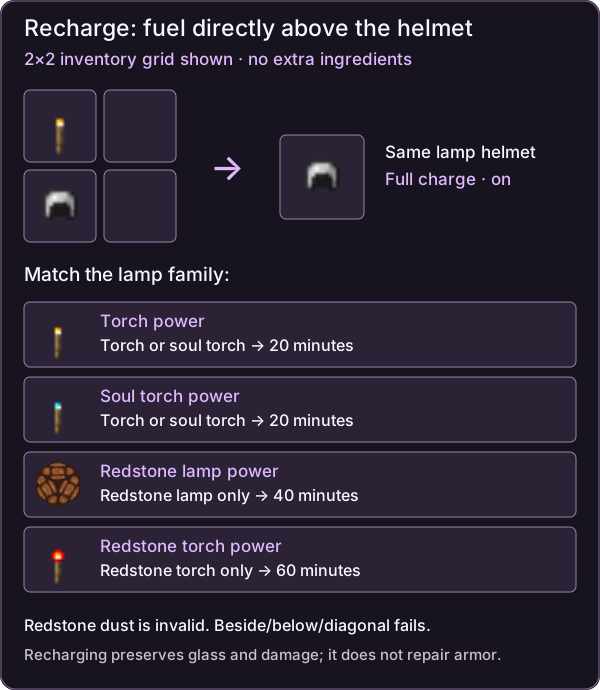
Recharge placement illustration. The same column is required in either crafting grid; use the accepted fuel for your lamp family. The example helmet represents an existing headlamp. Vanilla artwork © Mojang/Microsoft; original wiki layout.
To recharge, put one accepted fuel directly above the headlamp, in the same column, with no extra ingredients. The 2×2 inventory grid works. Beside, below and diagonal placements fail. The fuel is consumed; the helmet returns fully charged and switched on, keeping its damage and glass.
Torch and soul-torch fuel can switch between those two modes. They cannot recharge either redstone family. Redstone dust is not valid fuel. Older 1.3 claims about arbitrary redstone fuel and 60-minute redstone-lamp recharges were superseded by 1.3.1.
Recharging does not repair armor. Anvil repair does not recharge the lamp. If you want different glass or a different power family, use the full nine-slot recipe again with fresh ingredients and the existing lamp helmet; that also gives a fresh charge.
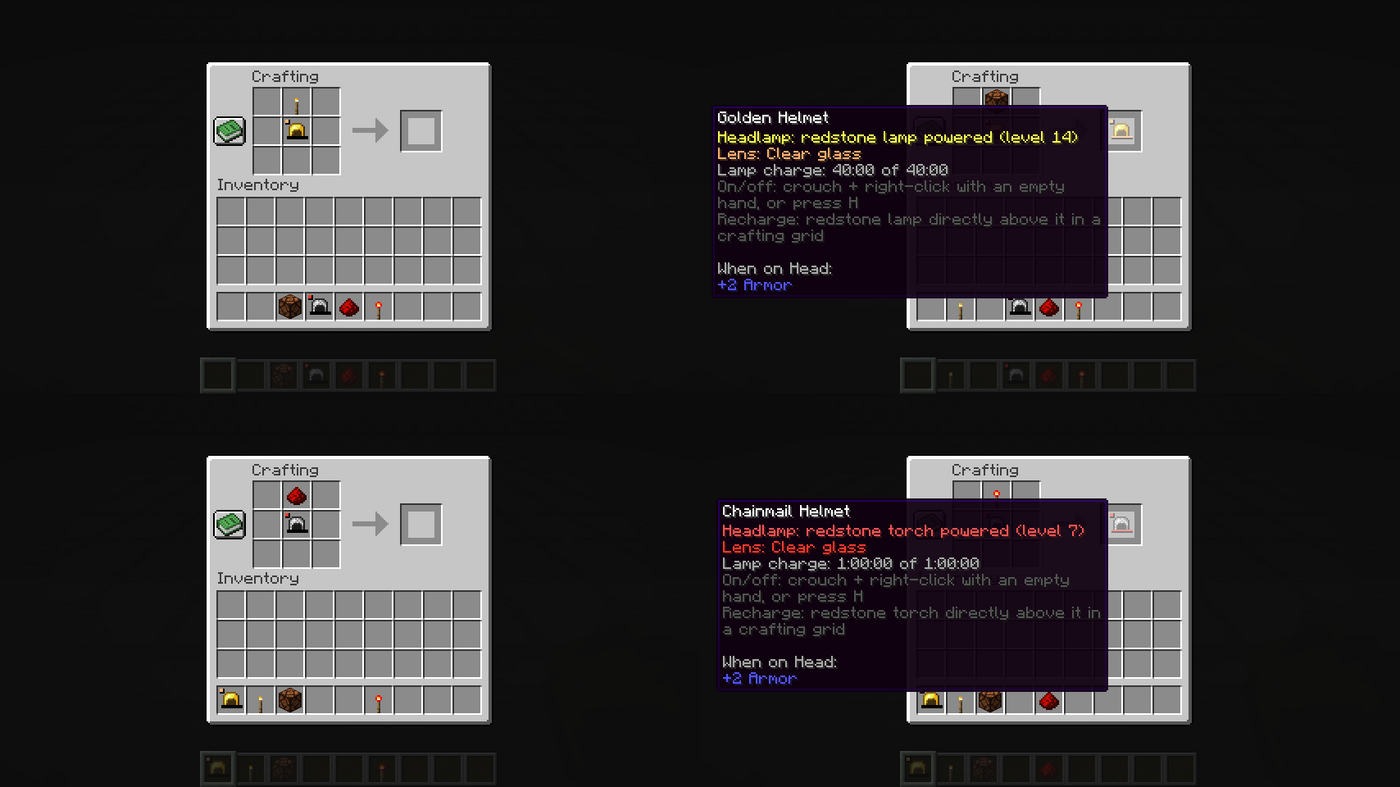
Historical version 1.3.1 recharge checks, supplied development record. The accepted redstone-lamp recharge shows 40 minutes; the redstone-torch recharge shows 60 minutes. These are prior recorded checks.
Choose glass separately from power
The six glass blocks set the lens and emitted hue. Clear glass follows the power-source color. Tinted or stained glass sets its own color without changing brightness or capacity. A red-glass soul-torch lamp is red, level 10, and has the default 20-minute capacity.
| Glass choice | Light color | Glass choice | Light color |
|---|---|---|---|
| Clear | Power-source color | Tinted | Tinted-glass tint |
| White | White tint | Light gray | Light gray tint |
| Gray | Gray tint | Black | Black-glass tint |
| Red | Red tint | Orange | Orange tint |
| Yellow | Yellow tint | Lime | Lime tint |
| Green | Green tint | Cyan | Cyan tint |
| Light blue | Light blue tint | Blue | Blue tint |
| Purple | Purple tint | Magenta | Magenta tint |
| Pink | Pink tint | Brown | Brown tint |
These are all 18 vanilla glass choices. The exact color values are in the expandable reference below. Surface colors, ambient light and shaders affect the result on screen. Recharging preserves glass, including its color override when switching between torch and soul-torch power.
Switch it on and manage charge
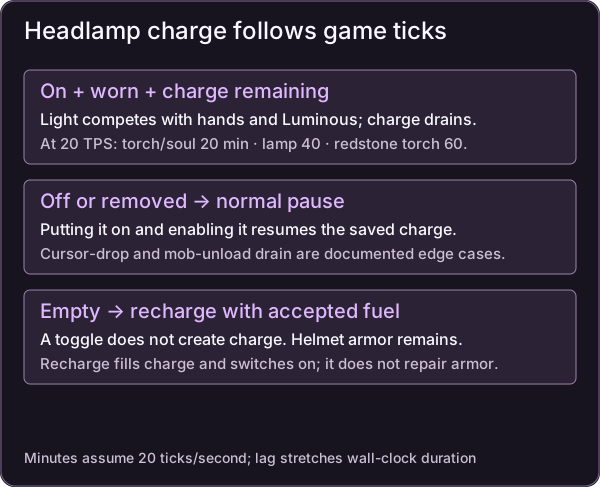
Charge-lifecycle diagram; the documented cursor-drop and mob-unload exceptions remain below.
Press H while wearing the helmet, in the game with no screen open. You can rebind Toggle Headlamp under Gameplay. Alternatively, crouch and right-click with an empty main hand while wearing it. Release use before pressing again; this gesture consumes the normal interaction.
A toggle gives an action-bar message and a quiet lever click. H does not create charge, and toggling an empty lamp cannot light it. Check the tooltip for type, level, glass, charge and controls. A lamp-charge bar appears above the durability bar, with a lens-color corner marker.
Switching off or removing the helmet normally freezes its remaining charge. Switching back on resumes it. When charge reaches zero, only the lamp stops; the helmet keeps its armor properties. A charged, enabled lamp may still be hidden by a brighter source or an earlier equal-brightness source on the same entity. See source competition and troubleshooting.
The timer uses game ticks. The displayed minutes assume 20 ticks per second, so server lag can stretch the wall-clock duration. Documented exceptions still need checking: a lamp dropped straight from the cursor immediately after removal may keep draining until pickup, and a mob’s equipped lamp can drain while its chunk is unloaded. Logout/login timing and visibility between two players are also outstanding runtime checks.
Admin & server owner reference
Eligibility and stored data
Exact source RGB colors for all glass choices:
| Glass | RGB | Glass | RGB |
|---|---|---|---|
| Clear | Power-source color | Tinted | #8C7AA8 |
| White | #F2F2F2 | Light gray | #CFCFCF |
| Gray | #9A9A9A | Black | #7A5AA8 |
| Red | #FF3A3A | Orange | #FF8A1F |
| Yellow | #FFE347 | Lime | #8CF23A |
| Green | #4FA83A | Cyan | #2FD0D0 |
| Light blue | #6CC8FF | Blue | #3D5CFF |
| Purple | #A65CFF | Magenta | #E054D8 |
| Pink | #FF9BC8 | Brown | #A8703F |
Crafting uses minecraft:head_armor, c:glass_blocks and c:glass_panes. Modded glass must qualify through the tag; color extraction additionally recognizes beacon-color glass behavior. A colored texture alone is insufficient. The stored component is dynamicitemlights:headlamp.
Clear-glass colors by power are torch #FFB54A, soul torch #4FD6FF, redstone lamp #FFB070, and redstone torch #FF3B2F.
The component stores mode, brightness, remaining and maximum charge, a time anchor, on/off state and glass color. When on and anchored, it subtracts elapsed game ticks and clamps remaining charge at zero. The server anchors a worn lamp and settles elapsed charge every 200 ticks, about 10 seconds at normal speed. Inventory/cursor checks freeze removed player lamps; logout handling freezes the worn lamp. Clients calculate countdowns from synchronized game time.
The server accepts at most one toggle per player per four ticks and changes only the sender’s head slot. Lamps saved without on/off or glass fields default to on and clear glass; this is implementation evidence, not certification of every migration.
Server balance changes
Headlamp settings take effect when a helmet is next crafted or recharged. Existing stored brightness and capacity remain unchanged until then. Lamp data is independent of helmet durability.
Figure source notes
Historical version 1.1 capture from the supplied project, also used on report page 7. It illustrates the worn lamp; it is not a new 1.3.1 gameplay check or a picture of the current crafting recipe.
Historical version 1.3.1 recharge checks, supplied project/report page 8. The accepted redstone-lamp recharge shows 40 minutes; the redstone-torch recharge shows 60 minutes. These are prior recorded checks.
Sources & verification
Evidence: pdf-derived. Feature status: implemented-static. Article coverage: ready.
PDF pages 5, 7-10, 13-14, 17-18, 22, 24 · 03, 05-08, 11-12, 15-16, 20, 22 · DIL-PDF:S01; DIL-PDF:S02; DIL-PDF:S03; DIL-PDF:S08; DIL-PDF:S09; DIL-PDF:S10; DIL-PDF:S11; DIL-PDF:S14
October 23, 2026 source-based 1.3.1 snapshot. Historical checks are attributed; neither same-version JAR is proven equivalent. No new gameplay, build, multiplayer or compatibility verification.
The wiki has not independently playtested report-derived instructions. Your server or modpack settings may change them.