Getting started with Dynamic Item Lighting
Take a torch into the dark, keep both hands free with a headlamp, or eat glow berries for a short-lived light.
These guides describe the October 23, 2026 source snapshot. Two different downloads share the 1.3.1 label; neither was confirmed to match this snapshot.
Take light with you
Hold a torch to brighten your surroundings, drop a supported item as a temporary visual marker, or fit a rechargeable headlamp to your helmet to free both hands. Eating glow berries gives a short burst of light through the Luminous effect.
Keep placing real lights where gameplay requires them. Portable illumination changes how the scene looks. It does not change world-light data, mob spawning, crop growth, AI, or the light values shown by F3.
These guides describe the source-based 1.3.1 snapshot in the October 23, 2026 report. The report found two different JARs labeled 1.3.1 and did not establish that either matches that snapshot. Installation and gameplay have not been tested for this wiki.
Install the intended build
You need Minecraft Java Edition 1.21.1, NeoForge 21.1.200 or newer within the intended 1.21.1 setup, and Java 21. The source’s development target is NeoForge 21.1.252. It declares no additional required mod dependencies.
- Put the intended Dynamic Item Lighting JAR in that NeoForge installation’s
modsfolder. - For multiplayer, install the same intended build on the server and every player’s client.
- Open a dark area and hold an ordinary torch. Empty that hand, then drop the torch and pick it up again. The expected result is portable brightness that appears and disappears with the eligible source.
- If nothing changes, run
/dilclient statusand follow settings and troubleshooting.
Everyone joining a multiplayer server needs the mod, including the server itself. Joining a server without it has not been checked and may fail. These instructions cover NeoForge; other mod loaders and Bedrock are not confirmed. If you use shaders or another graphics mod, check the troubleshooting guide first.
Choose your light
| What you want | What to do | What to remember |
|---|---|---|
| A quick light | Hold a torch in either hand | A torch is level 14 and stops emitting when its light origin is submerged. |
| A light that stays on underwater | Hold a lantern | Its level-15 rule permits submerged use. |
| Both hands free | Craft and wear a headlamp | It needs charge and must be switched on. |
| A brief light without equipment | Finish eating glow berries | Luminous lasts 600 game ticks, about 30 seconds at normal speed. |
| A temporary visual marker | Drop an eligible item | Pickup, merging, removal or despawning can end that source. |
The light-source guide explains water, colors and competing lights. The complete bundled catalog lists all 83 default item rules. Those rules apply to existing vanilla items; this mod does not add 83 new items or make otherwise unobtainable items craftable.
Try Luminous
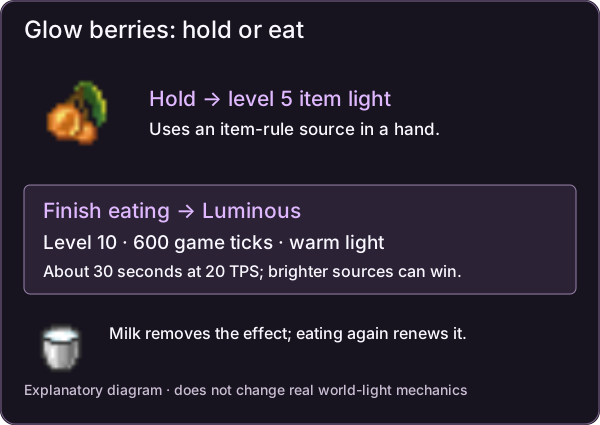
Luminous explanation using vanilla item artwork, not a gameplay screenshot. Vanilla artwork © Mojang/Microsoft; original wiki diagram.
Finish eating glow berries as a player to receive warm, level-10 light. Eating another serving restarts the 600-tick duration. Milk removes the effect. Merely holding glow berries is a separate, dimmer level-5 item rule.
A brighter held item or headlamp can hide Luminous’s emitted light without removing its timer. For example, Luminous outshines a default redstone-torch headlamp, while a regular torch headlamp outshines Luminous. At equal brightness, the winner follows the order in competing sources.
Look for the Luminous icon beside your other active effects. Eating glow berries triggers it only for players. The report has not confirmed that a second player sees the effect correctly.
Make your next trip easier
A useful next step is to craft a headlamp and carry the fuel its family accepts. Start graphics quality at Balanced with adaptive quality enabled, then adjust the maximum after observing your own game. Quality presets set work budgets; they are not frame-rate guarantees.
There is no added quest chain, new world, boss progression or special ingredient economy. Use the ordinary game’s ways of obtaining ingredients.
Admin & server owner reference
Build and identity
The optional policy channel does not establish vanilla-client compatibility. Operators can assign the registered Luminous effect to other living entities through the game’s effect command; eating triggers it only for players.
The actual mod ID is dynamicitemlights; the wiki’s URL slug is dynamic-item-lighting. The declared Minecraft range is [1.21.1,1.21.2). The data component dynamicitemlights:headlamp attaches to helmets; it is not an item ID. The effect ID is dynamicitemlights:luminous, with source color #FFC34D. The two recipe serializers implement headlamp crafting and recharging.
See server configuration for authority and settings, and custom light rules for local files, data packs and developer adapters. Detailed report evidence and build fingerprints are in the section’s maintainer packet; no JAR equivalence, new compile or runtime test is claimed here.
Sources & verification
Evidence: pdf-derived. Feature status: implemented-static. Article coverage: ready.
PDF pages 3-6, 11, 18, 21-24, 31 · 01-04, 09, 16, 19-22 and Appendix C · DIL-PDF:S01; DIL-PDF:S02; DIL-PDF:S03; DIL-PDF:S04; DIL-PDF:S05; DIL-PDF:S09; DIL-PDF:S10; DIL-PDF:S11; DIL-PDF:S15
October 23, 2026 source-based 1.3.1 snapshot. Historical checks are attributed; neither same-version JAR is proven equivalent. No new gameplay, build, multiplayer or compatibility verification.
The wiki has not independently playtested report-derived instructions. Your server or modpack settings may change them.